Holy guacamole, when I first launched the Hot Wheels expansion in Forza Horizon 5, I felt like a kid who'd mainlined sugar at a carnival! Those gravity-defying loops, corkscrews, and mile-high ramps had me screaming "Yeehaw!" like a cowboy riding a tornado. But then bam—this funky circle thing called "G-Forza" popped up on my screen, wobbling like a drunk UFO. At first, I thought my coffee had been spiked. Turns out, it's an "Artificial Horizon" inspired by airplane cockpits, showing your car's tilt mid-air. Cool in theory? Heck yeah! But after my 50th upside-down loop-de-loop, that shimmying HUD felt like an annoying backseat driver. I mean, come on—I'm trying to channel my inner Speed Racer, not pilot a 747!
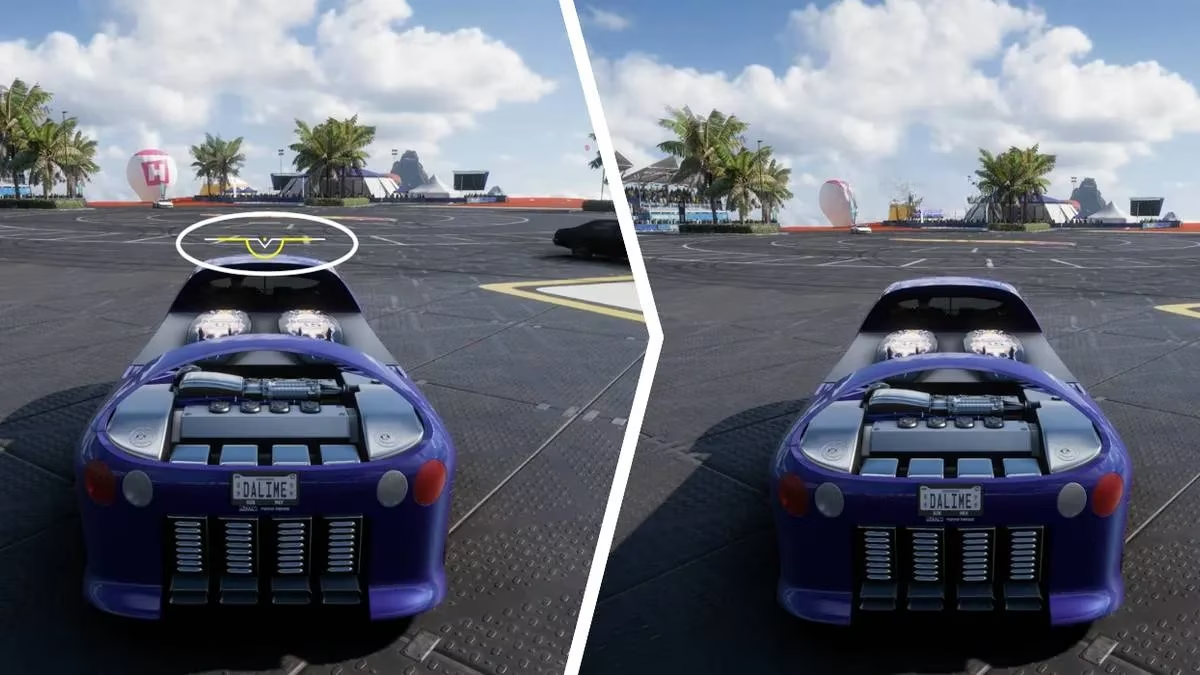
Let's geek out for a sec: The Hot Wheels DLC is pure, unadulterated chaos. We're talking tracks that twist like spaghetti in a blender, where hitting 250mph feels like a casual Tuesday. The G-Forza reticule? It's your gyroscopic BFF, dynamically showing your car's rotation so you can pull off gnarly stunts. The faster you go and the crazier the angle, the more "G-Forza skills" you rack up—kinda like getting bonus XP for being a daredevil. I’ll admit, when I nailed my first vertical climb with the reticule perfectly centered, I felt like Einstein of asphalt. But after three hours of that thing jiggling in my peripheral vision like a hyperactive disco ball, my eyeballs staged a mutiny. Talk about sensory overload!
Now, here’s the kicker: Some players adore this feature (shoutout to my flight-sim enthusiast pals!), but for us purists who just wanna see clean hood decals and scenic Mexican vistas? It’s a total vibe killer. The good news? Turning it off won’t nerf your skill gains—you just lose the visual tilt indicator. Phew! No more feeling like you’re trapped in a tilt-a-whirl during a zen driving session.
So, how do you ditch this digital wobble? Easy-peasy lemon squeezy! I’ll guide you through the settings like a GPS for sanity:
-
Pause the madness 🎮 - Hit that pause button mid-race when your car’s not doing a barrel roll (safety first, amigos!).
-
Navigate to Campaign 📜 - Slide over to that tab like you’re choosing the juiciest taco on the menu.
-
Dive into Settings ⚙️ - Spot that tiny gear icon in the bottom-right corner? Bullseye! Click it.
-
Scroll to Accessibility ♿ - Keep going down until you see this gem. It’s where magic happens!
-
Find ‘Hot Wheels Roll Indicator’ 🔄 - It’s chilling at the bottom like the last cookie in the jar.
-
Toggle that sucker OFF 🚫 - Flip the switch, save changes, and exit like a boss.
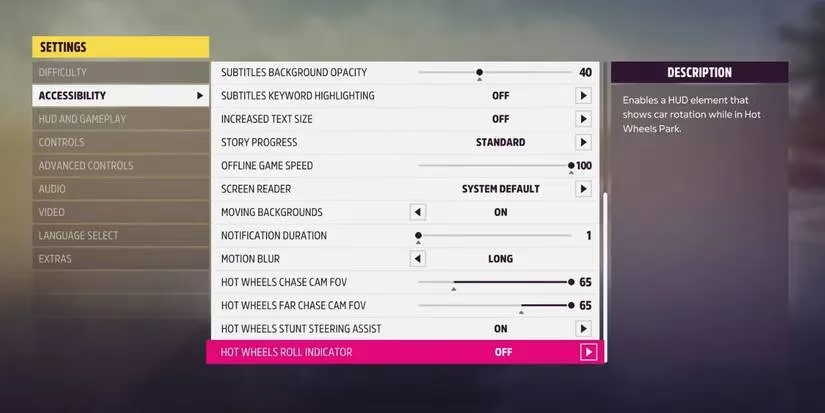
Boom! Instant visual detox. The first time I raced post-toggle, it was like wiping fog off glasses—suddenly, I could actually see those gorgeous Hot Wheels rainbows without a gyro-dancer stealing the show. And guess what? My stunt scores didn’t tank! I still bagged airtime skills like a pro. Feeling nostalgic later? Just repeat the steps and toggle it back on. Flexibility for the win!
In 2025, this expansion still slaps harder than a rogue piñata. Whether you’re on Xbox or PC, remember: Play your way. Want that cockpit thrill? Rock the G-Forza! Prefer minimalist HUDs? Toggle it off and let the rubber-burning speak for itself. Either way, you’re in for a ride that’ll make your inner 8-year-old squeal.
🔥 Hot Wheels G-Forza FAQ (because y’all slid into my DMs) 🔥
Q: Wait, what even IS G-Forza? Sounds like a fancy Italian sports car.
A: LOL, nah mate—it’s your roll indicator! Think airplane gyroscope meets arcade racer. Shows your car’s tilt during loops. Helps time stunts but can be clingier than overcooked pasta.
Q: If I turn it off, do I still earn those sweet, sweet skills?
A: Absolutely! You just won’t see the tilt animation. Skills depend on speed/angle, not the HUD. Off = cleaner screen, same rewards. Win-win!
Q: How do I reactivate it when I miss the wobble?
A: Same settings path, amigo! Pause > Campaign > Settings > Accessibility > Toggle to "On." Takes 10 seconds. Easy as pie.
Q: Is this Hot Wheels jazz available on all platforms?
A: You betcha! Xbox One, Series X|S, and PC. No PlayStation though—sorry, Sony stans!
Q: Does disabling it affect other assists like traction control?
A: Nope! Only murders the artificial horizon. Your other settings stay snug as a bug. No collateral damage!
Q: Any pro tips for racking up G-Forza skills faster?
A: Oh honey, three words: SPEED, ANGLE, REPETITION. Hit loops at 200mph+, tilt like you’re dodging paparazzi, and repeat. Soon you’ll be swimming in skill points like Scrooge McDuck!
Comments